Download
Zishu Terminal (Beta)
https://github.com/zishutron/Stardust-store/releases/download/v5.0.1/Zishu.Terminal.Beta._v5.0.0-beta.1.501.apk
Zishu Terminal (Beta) — Official Launch Article
A Android Terminal & Lightweight Developer Environment
---
Introduction
Today, ZISHU TRON is proud to announce the first public beta of Zishu Terminal — a mobile-first terminal emulator and lightweight developer environment built exclusively for Android.
Zishu Terminal is not a Termux clone. It is not a Linux distribution. It does not attempt to bypass Android's security model, and it does not claim capabilities that the platform cannot deliver. Instead, it is a focused, honest, and functional terminal application that brings real command-line workflows to Android devices within the boundaries of the Android sandbox.
This is an early-access release. Every feature described below works. Every limitation described below is real. Nothing is faked, and nothing is over-promised.
---
What is Zishu Terminal?
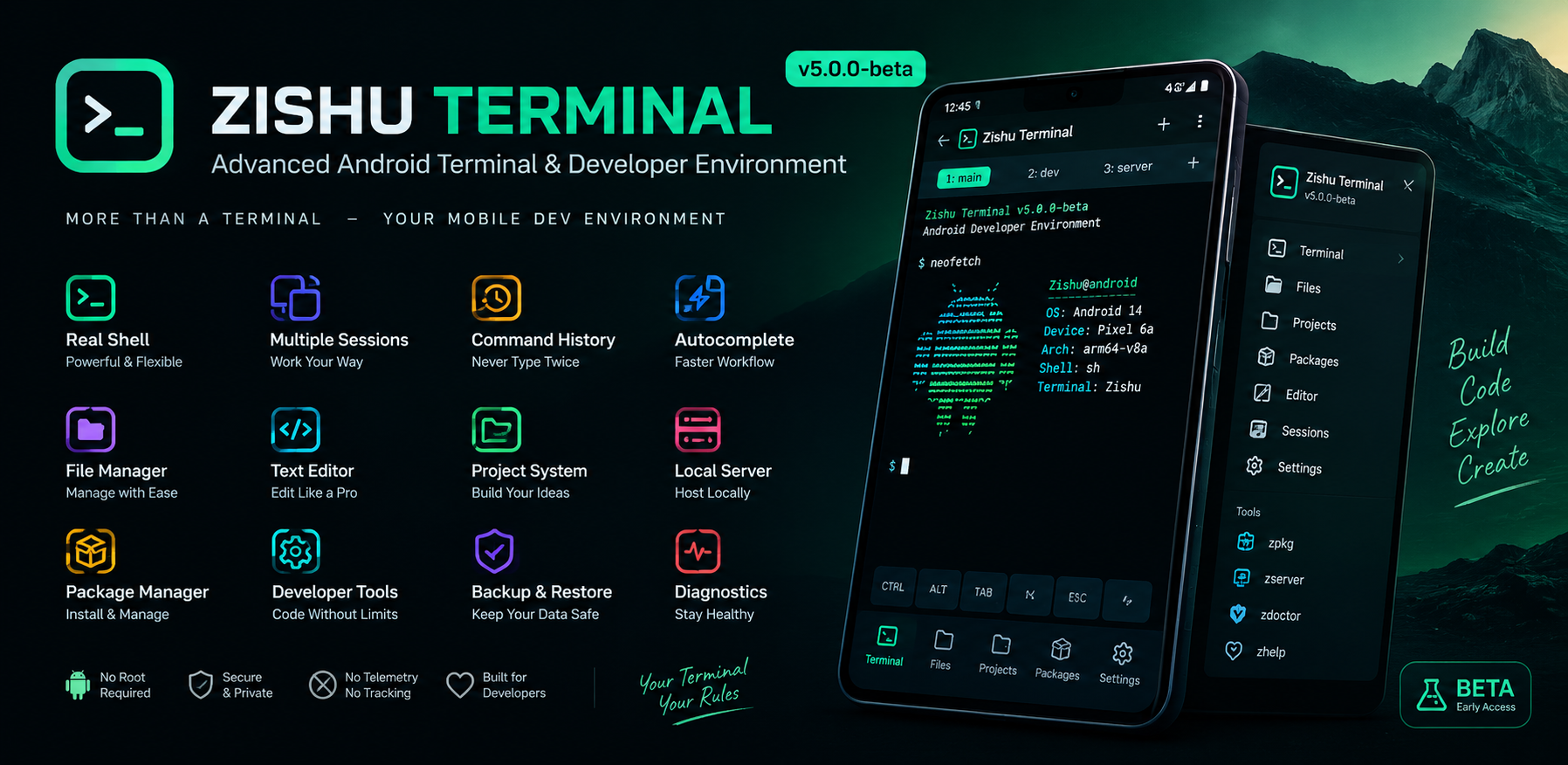
Zishu Terminal is a native Android application that provides:
· A real shell using Android's /system/bin/sh
· Multiple independent terminal sessions running in parallel
· ANSI color support (16-color and 256-color palettes)
· A command history system with keyboard navigation
· Autocomplete for commands and file paths
· A built-in file manager with full CRUD operations
· A lightweight text editor with search and line numbers
· A local development server bound to 127.0.0.1
· A package manager (zpkg) supporting local packages
· A structured userspace with $HOME, $PREFIX, $PATH, and $TMPDIR
· Environment diagnostics via zdoctor
· Backup and restore of settings, history, and package metadata
· Terminal profiles and three built-in themes
Everything listed above is implemented with real Android APIs. Nothing is a mockup, a placeholder, or a demo screen.
---
Design Philosophy
Zishu Terminal is built around three non-negotiable principles:
1. Honesty
If a feature is not implemented, it is not shown as available. If a command is not installed, the terminal reports command: not found — the real shell error. There are no fabricated outputs, no fake package lists, and no simulated tool results. Every status indicator in the application is derived from a real runtime check.
2. Respect for Android Security
Zishu Terminal never requests root. It never attempts to bypass the Android sandbox. It never modifies system partitions, never installs APKs silently, and never hides processes. It works entirely within the permissions Android grants it, and it operates within the private data directory that Android assigns to every application.
3. Mobile-First Design
The terminal interface is not a desktop layout squeezed onto a phone screen. It is designed for touch, for one-handed use, and for the realities of the Android keyboard. Every interaction — command entry, history navigation, session switching, file browsing — has been reconsidered for a mobile context.
---
Feature Overview
Terminal Engine
· Real /system/bin/sh process
· Persistent shell sessions
· Separate stdout and stderr handling
· Background I/O threads — the UI thread is never blocked
· Bounded output buffer to prevent memory exhaustion
· Graceful handling of process termination
· Shell restart without losing the session
· Support for interrupt signals (CTRL+C) where the platform allows
Terminal Emulation
· ANSI escape sequence parsing
· 16-color and 256-color foreground support
· Bold, underline, and reverse video attributes
· Carriage return and backspace handling
· Escape sequence stripping for unsupported sequences (no visible garbage)
· Interactive command support where technically practical
User Interface
· Full-screen terminal layout
· Monospace typography throughout
· Adjustable font size (8–30 sp)
· Adjustable terminal padding
· Themed blinking cursor (dark, light, and green variants)
· Three themes: Dark Terminal, Light Terminal, Soft Green
· Quick-access keyboard bar with ESC, TAB, CTRL, ALT, arrows, and common symbols
· Landscape orientation support
· Keyboard-aware layout (adjustResize)
· Smart back button (hides keyboard before navigating away)
Sessions
· Create, rename, duplicate, switch, and close sessions
· Restart a shell within an existing session
· Session state is preserved across activity lifecycle
· Independent working directory per session
· Independent command history context per session (where practical)
· Status indicators (running, stopped, error)
Command History
· Persistent across app restarts
· Up/down arrow navigation
· Searchable history screen
· Configurable maximum size
· Duplicate suppression
· Clear history with confirmation
File Manager
· Browse any accessible directory
· Create files and folders
· Rename, delete, copy, and move
· Display file size and modification date
· Open files directly in the editor
· Support for hidden files
· Sort by name, type, or date
Text Editor
· Open and edit any plain-text file
· Save and Save As
· Search within file
· Line numbers
· Revert to last saved version
· Handles common extensions: .txt, .sh, .json, .xml, .html, .css, .js, .java, .md
· Safe handling of large files (truncation warning, no crash)
Project Management
· Create project scaffolds
· Build system detection:
· Makefile → make
· package.json → npm run build
· setup.py → python setup.py build
· build.sh → sh build.sh
· Run commands based on project type
· Project info and cleanup
Local Development Server
· Serve any directory over HTTP
· Binds exclusively to 127.0.0.1 by default
· Configurable port (default 8080)
· Start, stop, restart, and status commands
· Dedicated control UI
· Access logging
Package Manager (zpkg)
· Install local .zpkg packages
· Remove installed packages
· List and search installed packages
· Display package metadata
· Repository configuration (HTTPS-only enforced)
· Dependency resolution with cycle detection
· Database health check (zpkg doctor)
· Package cache management (zpkg clean)
Userspace
· $PREFIX — Zishu-managed userspace root
· $HOME — user home directory
· $TMPDIR — temporary files
· $PATH — executable search path
· Directory structure: bin/, lib/, libexec/, share/, etc/, include/, opt/, var/, tmp/, home/
· Environment variable management (zenv)
· Path resolution (zpath, zwhich)
Diagnostics
· zdoctor — real environment checks
· ztools — honest tool detection
· Reports OK, WARN, or FAIL based on actual system state
· Never fabricates a "success" result
Backup & Restore
· Backup settings, command history, and package metadata
· Restore from most recent backup
· Reset preferences only (never deletes user files)
· Non-destructive by default
---
Command Reference
System Commands
All standard Android shell commands work, including:
```
pwd ls cd echo cat mkdir
rmdir rm cp mv touch head
tail grep find which whoami id
date uname getprop env printenv clear
exit sh
```
If a command is not present on the device, the terminal reports the real error:
```
$ python
/system/bin/sh: python: not found
```
Zishu Commands
```
zhelp [topic] Show help, optionally for a specific topic
zinfo System and environment information
zclear Clear terminal output
zversion Show version
ztheme Theme management
zhistory Command history screen
zsession Session information
zstorage Storage information
zpath Print Zishu paths
zenv Environment variable management
zwhich <cmd> Locate an executable
zdoctor Environment diagnostics
ztools Detected tools
zjobs Tracked background jobs
zfind <term> Search files
zbuild Detect and build current project
zprofile Manage terminal profiles
zpkg ... Package manager
zproject ... Project management
zedit <file> Open editor
zrun <script> Run a shell script
zserver ... Local development server
zbackup Backup configuration
zrestore Restore from backup
```
Package Manager
```
zpkg help Show help
zpkg list List installed packages
zpkg installed Alias for list
zpkg info <name> Show package details
zpkg search <term> Search local database
zpkg install <dir> Install a local .zpkg
zpkg remove <name> Remove installed package
zpkg update Refresh local index
zpkg upgrade Check for upgrades
zpkg clean Clean package cache
zpkg doctor Check package database
zpkg repo list List repositories
zpkg repo add <n> <url> Add HTTPS repository
zpkg repo remove <name> Remove repository
zpkg repo enable <name> Enable repository
zpkg repo disable <name> Disable repository
```
Projects
```
zproject create <name> Create a new project
zproject list List all projects
zproject info <name> Show project info
zproject open <name> Enter project directory
zproject run <name> Run project
zproject build <name> Build project
zproject clean <name> Clean build artifacts
zproject delete <name> Delete project
```
---
Security & Privacy
Zishu Terminal is built on a foundation of transparency. There is no hidden behavior, no analytics, and no telemetry of any kind.
What Zishu Terminal does not do
· It does not request root access
· It does not attempt to bypass Android's sandbox
· It does not modify system partitions
· It does not install APKs silently
· It does not execute arbitrary code from remote sources
· It does not collect telemetry or analytics
· It does not include advertising SDKs
· It does not require an account
· It does not sync data to the cloud
· It does not make hidden network requests
What Zishu Terminal does
· It binds its local development server exclusively to 127.0.0.1 by default
· It accepts only HTTPS repository URLs
· It verifies package integrity using SHA-256
· It performs all operations within the Android application sandbox
· It works fully offline for all core features
Permissions
Zishu Terminal requests only the permissions necessary for its documented features:
Permission Purpose
READ_EXTERNAL_STORAGE File manager access to user files
WRITE_EXTERNAL_STORAGE File writes (limited to API 28 and below)
WAKE_LOCK Optional "keep screen awake" feature
INTERNET Local development server on 127.0.0.1
No location, camera, microphone, contacts, SMS, or call log permissions are requested.
---
Current Limitations (Beta v5.0.0-beta.1)
Zishu Terminal is an early-access beta. The following are honest limitations of this build and are not hidden behind fake features:
Developer Toolchains
The following tools are not bundled with this release:
· Python interpreter
· Git
· OpenSSH client
· Node.js and npm
· C and C++ compilers (clang, gcc)
· Java compiler (javac)
These are large native binaries that cannot be reliably packaged into a small Android APK without dedicated cross-compilation infrastructure. Bundling them improperly would result in a broken, unstable application — which contradicts the project's commitment to real functionality.
Future versions of Zishu Terminal will make these toolchains available through the package management system (zpkg), where users can install them explicitly as separate, verified packages.
Remote Package Downloads
The package manager supports the full architecture for remote repositories — including repository configuration, HTTPS enforcement, checksum verification, and dependency resolution — but remote package downloads are not enabled in this build. This is an honest gap, and it is documented as such in the application itself.
The remote package ecosystem is planned for v5.5.
Root Access
Zishu Terminal will never request root access. It will never attempt to bypass the Android security model. Users who require root-level functionality should use tools designed for rooted devices.
---
Technical Details
Property Value
Package name com.zishu.terminal
Version 5.0.0-beta.1
Version code 501
Minimum SDK 21 (Android 5.0 Lollipop)
Target SDK 29 (Android 10)
Language Java
Framework Classic Android APIs (no AndroidX, no Kotlin)
Build system Compatible with Android Code Studio
APK size ~1 MB
External dependencies None
Zishu Terminal is built with classic Android framework APIs only. It does not use AndroidX, Jetpack, Material Components, Kotlin, or any third-party library. This makes the application lightweight, fast, and easy to audit.
---
Roadmap
Zishu Terminal will evolve through a series of planned releases, each focused on real, verified functionality.
v5.1 — Stability & Feedback
· Bug fixes based on user reports
· Performance improvements
· Documentation updates
· Community feedback integration
v5.5 — Remote Package Ecosystem
· HTTPS repository support (fully implemented)
· Package index download and parsing
· Package download with progress
· SHA-256 integrity verification
· Dependency resolution across repositories
· Transactional installation with rollback
· zpkg upgrade fully functional
· Package cache management
v6.0 — Developer Toolchains
· Community-contributed .zpkg packages
· Python, Git, OpenSSH, Node.js, and C/C++ compilers made available as installable packages
· Toolchain status UI reflecting actual installation state
· Package verification and signature architecture
Each of these milestones represents a genuine technical commitment. Features are announced only when they are implemented and verified, not before.
---
Download
Zishu Terminal — Beta v5.0.0-beta.1
🔗 Download APK:
https://github.com/zishutron/Stardust-store/releases/download/v5.0.1/Zishu.Terminal.Beta._v5.0.0-beta.1.501.apk
System Requirements:
· Android 5.0 (API 21) or newer
· Approximately 5 MB free storage
· No root required
· Works offline
Installation Note: Since this is a beta distributed outside of Google Play, Android may display a warning about installing applications from unknown sources. This is normal and expected for beta distributions.
---
Feedback and Contributions
Zishu Terminal is an independent project developed by ZISHU TRON. Community feedback is essential to the project's continued development.
If you encounter a bug, please report it with the following information:
· Android version
· Device manufacturer and model
· The exact command or action performed
· Expected behavior versus actual behavior
· Screenshots or logs if available
Feature requests and suggestions are equally welcome. When making a suggestion, please specify whether you are describing a new feature or proposing an improvement to an existing one.
---
A Note on Honest Software
In an ecosystem where applications frequently overstate their capabilities, Zishu Terminal takes a different approach. It describes what it does, and it delivers exactly that. It does not claim to be a full Linux environment because it is not one. It does not claim to include developer toolchains because they are not bundled. It does not claim to support remote package installation because that feature is not yet enabled.
This is a deliberate choice. The project's credibility depends on users trusting that when a feature is listed, it works, and that when a feature is absent, the absence is acknowledged.
Zishu Terminal is a mobile terminal that respects Android, respects its users, and respects the truth. It is offered in beta form so that its community can help shape its development honestly and transparently.
---
Conclusion
Zishu Terminal represents a sincere effort to bring a real terminal to Android — one that works within the platform's security model, one that behaves predictably, and one that does not over-promise.
It is not a replacement for Termux. It is not a replacement for a Linux workstation. It is a focused, honest, and functional terminal that fills a specific need: giving Android users a reliable command-line environment that behaves the way a terminal should.
Try it. Test it. Report what works, and report what doesn't. Together, we can build something that genuinely serves developers and power users on Android.
---
ZISHU TRON
Building honest software for Android.
🔗 Download: https://github.com/zishutron/Stardust-store/releases/download/v5.0.1/Zishu.Terminal.Beta._v5.0.0-beta.1.501.apk