Download Zishu OS v1.0.0 (APK)
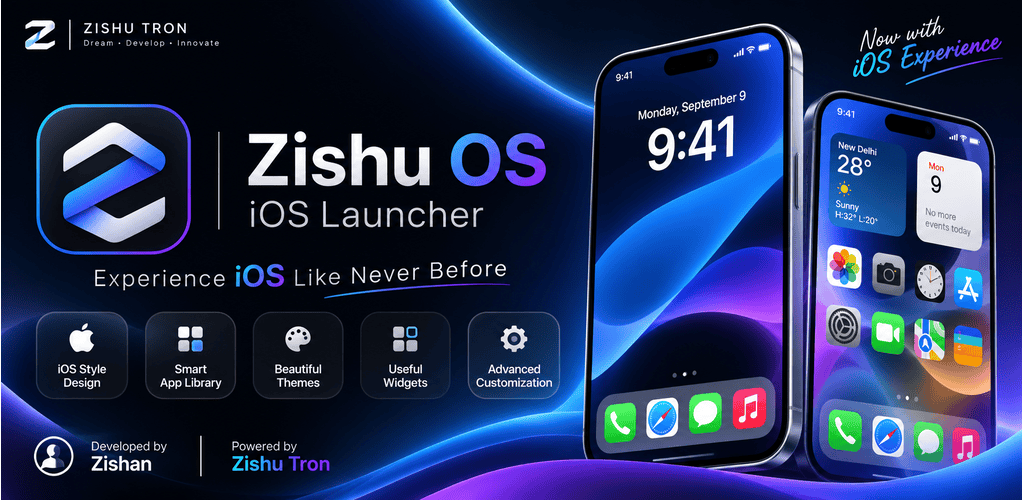
Zishu OS is built by ZISHU TRON under one idea: Your Phone. Your Style. It replaces your launcher, then goes further. Control Center, Notification Center, Recent Apps, the lock screen and the charging screen are all part of the same design, and so are four everyday apps. Everything is a native Android interface written in Java, so it stays fast on ordinary phones.
Why we built Zishu OS
Most launchers decorate the home screen and stop there. The rest of the phone, such as the dialer, the gallery, messages and the browser, still looks and behaves like someone else's design. We wanted one consistent experience from the first swipe to the last tap.
Three principles guided the work:
- Yours to shape. Layout, icon style, gestures, sounds and every panel can be changed from one place, the Control Panel.
- Private by default. No account, no analytics, no telemetry. The launcher, Photos, Messages and Phone never connect to the internet.
- Honest about permissions. Each permission is optional, asked only when you use the feature that needs it, and explained inside the app.
A home screen that is yours
The home screen is the heart of Zishu OS, and it is built to be rearranged.
- Free layout. Multiple pages, folders, widgets and a Today page, with an Adjust Layout mode to place everything where you want it.
- Icon styling. Pick the icon shape, size and spacing, and choose between your apps' own icons and an icon pack style.
- App drawer. A smooth drawer with an alphabet index and built-in search.
- Wallpapers and blur. Set a wallpaper and let panels blur the picture behind them.
- Gestures. Double tap, swipe and navigation gestures, each one assignable to an action such as opening Recent Apps or the Control Center.
- Backup and restore. Save your whole layout and settings, and bring them back after a reset or on a new phone.
Control Center and Notification Center
Control Center opens with a swipe down from the status bar, on the home screen and over other apps. It holds quick toggles, brightness and volume, a screen timeout picker, shortcuts such as the flashlight and calculator, and a music player that shows the cover art of whatever is playing, whichever app plays it.
Notification Center shows your notifications as clean glass cards, on the home screen and on the lock screen. Cards are alive, not just text:
- Music and video notifications get previous, play or pause and next buttons and a seek slider you can drag.
- Downloads show live progress with a percentage, plus the app's own Cancel or Pause buttons.
- Calls in progress show the app's End call button right on the card.
- Ongoing items such as calls, music and downloads are listed first.
- Swipe a card away to clear it, or use Clear all.
Every one of these features has its own switch in Control Panel under Notification Center, so you decide exactly how much the list should do.
Recent apps, lock screen, charging and sounds
- Recent Apps. A card-style switcher with swipe-to-close and Close All. Choose the card size and how far back to list apps.
- Lock screen. A custom lock screen with a large clock, widgets and notifications. Unlocking uses your phone's own PIN, pattern, password or fingerprint, so Zishu OS never sees your credentials.
- Charging screen. An animated screen when you plug in, with its own settings.
- Sounds. Short sounds for navigation keys, panels, Recent Apps, notifications and Zishu Messages. Use one master switch, set each place separately, or apply a single sound everywhere with one tap.
Four apps that match the system
Zishu OS ships with four everyday apps, each customizable from its own row in Control Panel.
Zishu Phone. A dialer with contacts, favorites and call history, and a polished in-call screen. While you talk, the ongoing call can be controlled from Notification Center.
Zishu Photos. Browse your library by years, months, days or all photos, plus Collections.
- A smooth viewer with pinch to zoom, panning and a two-finger twist that rotates a photo or video and saves the turn into the file.
- Hold a video for 2x speed, drag sideways to scrub, or keep it playing in a small Picture-in-Picture window.
- Favorites, Hidden and Recently Deleted albums, protected by your phone's screen lock.
- Editing tools, duplicate, add to album, and change date or location.
- Your choice of accent color and light or dark appearance.
- Photos never connects to the internet.
Zishu Messages. SMS and MMS with threads, reactions, and pinned or hidden chats. Style every conversation's look, and share text or pictures to it from other apps through the Share menu.
Zishu Browser. A fast, clean and private browser with tabs, bookmarks, a Start Page, tab overview and downloads. It is the only part of Zishu OS that uses the internet.
Privacy and permissions
Zishu OS collects nothing. There are no ads, no analytics and no telemetry, and your layout and settings stay on your phone. The launcher, Photos, Messages and Phone do not use the internet; only Zishu Browser does, and the websites you open are their own business.
Some features need special access, and you can say no to any of them. The rest of Zishu OS keeps working.
Access
Used for
Notification access
Notification Center, lock screen notifications and music controls
Accessibility service
Gestures and Control Center over other apps
Display over other apps
Control Center and panels on top of apps
Usage access
Listing recent apps
Device admin
Turning the screen off with a gesture
Photos and videos
Zishu Photos library
Contacts, Phone, SMS
Zishu Phone and Zishu Messages
Notifications and foreground services
Saving a photo rotation, the video player notification and downloads
The Permissions screen inside the app explains each one in plain words: what it does, how it is used, and what happens if you refuse.
Download and install
Zishu OS v1.0.0 needs Android 5.0 or newer. Setup takes about a minute.
Download Zishu OS v1.0.0 (APK)
- Tap the download link above on your Android phone and save the APK file.
- Open the file. If Android asks, allow your browser or file manager to install apps from this source. You can turn this off again right after.
- Tap Install, then Open.
- Follow the short onboarding and choose Zishu OS as your home app when Android asks.
- Open the Control Panel and make it yours: layout, icons, gestures, sounds, Control Center and Notification Center.
To go back to your old launcher at any time, change the default home app in Android Settings. Your Zishu OS settings stay saved, and you can also back them up from inside the app.
Good to know
- Some phone makers limit background apps aggressively. If a panel or gesture stops working, allow Zishu OS to run in the background in your phone's battery settings, and keep it locked in Recent Apps.
- Notification Center and music controls depend on the apps that post the notification. If an app does not offer a seek bar or an End call button, Zishu OS cannot add one.
- Rotating a large video rewrites the file, so it can take a moment. You can cancel from the notification, and the original is replaced only when the new copy is complete.
- This is version 1.0.0. We are listening, and your feedback shapes what comes next.
Support
Questions, bugs or ideas: support.stardustofficial@gmail.com
© 2026 ZISHU TRON. All rights reserved.